Hydraulic System Topics
General
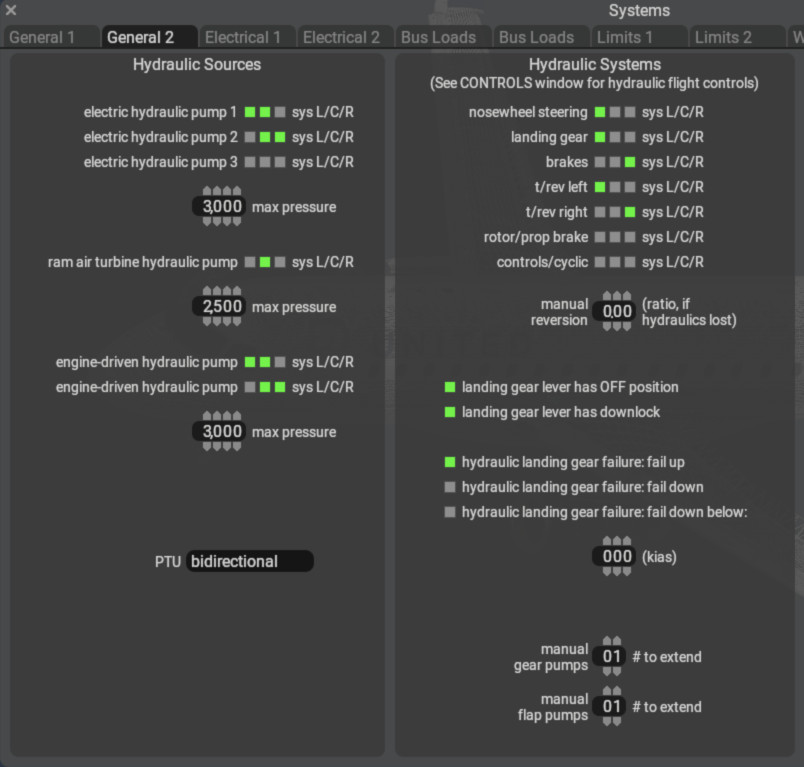
Click to Enlarge
X-Plane models 5 hydraulic power sources, 3 hydraulic circuits, and a hydraulics Power Transfer Unit. Hydraulic System Settings can be found on PlaneMaker's Standard > Systems > General 2 Tab and also at Standard > Control Surfaces > Hydraulics Tab. Articulating components CAN (but do not have to) be assigned to one or more of the three hydraulic circuits. Assigning any component to a hydraulic circuit(s) will cause X-Plane to make their operation dependent upon hydraulic power availability and also be subject to hydraulic failures and diminished actuation rates with low hydraulic pressure/flow.
Hydraulic Sources
Engine Driven Mechanical Pump (EDMP)
X-Plane assumes an EDMP can be on any engine. In PlaneMaker's hydraulic sources panel, you will see an engine driven hydraulic pump option for each engine attached to the aircraft, as well as the hydraulic circuits they can power. Hydraulic pressure from an EDMP becomes available when you assign it to any one of the L/C/R circuits. The max pressure parameter defaults to 1 (unitless), but can be any positive integer you like less than 10,000. Real EDMPs operate around 2500-3000 PSI. EDMPs operate continuously with engine RPM and if not failed, are available to provide hydraulic power.
//  The datarefs below act as 'valves' to the various hydraulic circuits.  If you set the first one to 1, then the other
//  three (A,B,C) will be set to 1 automatically also, likewise if you set the first one to 0.  You can use the A, B, C
//  datarefs individually to connect an EMDP to specific hydraulic circuits only.

sim/cockpit2/hydraulics/actuators/engine_pump int[n]    (0/1, OFF/ON,  per engine,  powers ALL circuits)
sim/cockpit2/hydraulics/actuators/engine_pumpA[n]       (0/1, OFF/ON,  per engine,  powers A/Left circuit)
sim/cockpit2/hydraulics/actuators/engine_pumpB[n]       (0/1, OFF/ON,  per engine,  powers B/Center circuit)
sim/cockpit2/hydraulics/actuators/engine_pumpC[n]       (0/1, OFF/ON,  per engine,  powers C/Right circuit)
Electrical Pump
The electric pumps are switched with the datarefs
sim/cockpit2/hydraulics/actuators/electric_hydraulic_pump_on int y boolean
sim/cockpit2/hydraulics/actuators/electric_hydraulic_pump2_on int y boolean
Again, switching them on does nothing unless the pump has been assigned a hydraulic system in PlaneMaker. If assigned in PlaneMaker, the pumps will consume the assigned amps from their electrical busses.
RAM Air Turbine
The RAT (ram-air turbine) automatically activates if it has been assigned in PlaneMaker, and the airplane is off the ground (weight-off-wheels) and all other hydraulic sources have failed and some time has passed for pressure to bleed from the system. Alternatively, the RAT can also be controlled manually with the dataref
sim/cockpit2/hydraulics/actuators/ram_air_turbine_on int y boolean
Rotor Pump
sim/cockpit2/hydraulics/actuators/prop_pump int[8] y boolean
sim/cockpit2/hydraulics/actuators/prop_pumpA
sim/cockpit2/hydraulics/actuators/prop_pumpB
sim/cockpit2/hydraulics/actuators/prop_pumpC
Bleed-Air 'Pump'
Hydraulic Circuits
WARNING
X-Plane Models three hydraulic CIRCUITS, which may be referred to as "Left/Center/Right", "L/C/R", "A/B/C" or "1/2/3" depending on the dataref name or description. When dataref names refer to the CIRCUIT or SYSTEM with a number or letter, then 1/A=LEFT, 2/B=RIGHT and 3/C=CENTER.
For electric hydraulic pump actuator datarefs, they are also identified with the numbers 1/2/3, but in this case, the numbers do not refer to a CIRCUIT, but only to the pump for identification purposes. It is perfectly possible to assign electrical pump 1 to system/circuit 2 in PlaneMaker. When referencing datarefs, be sure to check if it applies to the CIRCUIT or the PUMP itself.
X-Plane models three hydraulic circuits, Left / Center / Right. These circuit names are somewhat abstract if no PTU model is utilized, since any hydraulic power source or actuator may be assigned to any circuit, essentially ignoring true sideness; however, when using X-Plane's PTU model, then the sideness labels do become relevant. Best practice is to stay consistent and assign left side pumps to left side engines and circuit,
Hydraulic PTU
The power transfer unit can be installed with PlaneMaker to allow power transfer between system 1 (left) and system 2 (right). The PTU can either be uni-directional, allowing power transfer only in the specified direction, or bi-directional, in which case it will keep the weaker system powered by the stronger system, as long as the weaker system has enough hydraulic fluid left. Note that the PTU only transfers power, but no fluid is transferred between systems. When installed in the plane, the PTU has three possible states during flight:
sim/cockpit2/hydraulics/actuators/PTU int y enum

1.  PTU is off, and no power transfer takes place.
2.  PTU is armed and watching for pressure differential
3.  PTU is running currently, trying to equalize pressure. When pressure differential is minimized, it will fall back to state 1
In auto mode, which is the default, the PTU is watching for a pressure differential and will turn on and off as needed to keep it minimal. This causes the characteristic on-off-cycle that on some airplanes can be heard as a “barking dog” sound. This is a purely mechanical operation, no electric power or sensors are needed for this to work.
Hydraulic Quantity
sim/cockpit/misc/hydraulic_quantity         Hydraulic Quantity system 1 (left)      ratio • float • v9.2.0+
sim/cockpit/misc/hydraulic_quantity2        Hydraulic Quantity system 2 (right)     ratio • float • v9.2.0+
sim/cockpit/misc/hydraulic_quantity3        Hydraulic Quantity system 3 (center)
Hydraulic Components
Each of the components below CAN (but do not have to) be assigned to one or more hydraulic circuits. Assigning any of these to hydraulic circuits will cause X-Plane to make their operation dependent upon hydraulic power availability and also be subject to hydraulic failures and diminished actuation rates with low hydraulic pressure/flow.
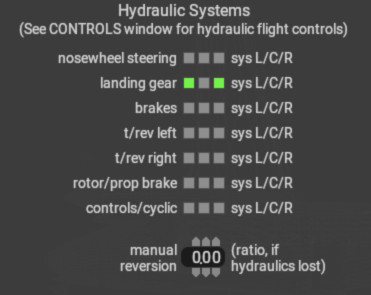
Standard > Systems > General 2 Tab
- Nosewhee Steering
- Landing Gear (More below)
- Emergency Wheel Brakes (via accumulator)
- Thrust Reversers
- Rotor/Prop Brake
- Cyclic Controls
NOTE
The flight controls listed below, available on wings and stabilizers, can be assigned to hydraulic systems on a per control, per side basis. Unlike the components above, whose hydraulic circuit assignments are made on Standard > Systems > General 2 Tab > Hydraulic Panel, these hydraulic assignments are made on PlaneMaker's Standard > Control Geometry > Hydraulics Tab , and the list of control components shown on this tab will be dynamically populated based on any wing elements that have been configured with any of these controls, i.e. if no wings have any control surface specified, this tab will be empty.
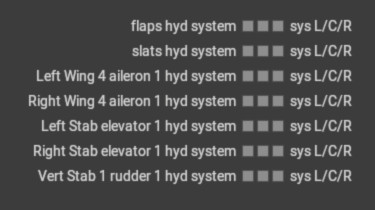
Standard > Flight Controls > Hydraulics Tab
- Flaps
- Slats
- Aileron Group 1
- Aileron Group 2
- Elevator 1
- Elevator 2
- Rudder 1
- Rudder 2
- Spoiler Group 1
- Spoiler Group 2
- Speed Brake Group 1
- Speed Brake Group 2
- Drag Rudder (Yaw Brake)
Hydraulic Gear
Hydraulic gear systems frequently have gear levers with a third “off” position that mechanically locks the gear in the up position without providing hydraulic pressure to keep it up. While various plugins or scripts have been used to animate this type of lever in the cockpit, interaction with X-Plane was always clumsy and did not necessarily work with commands. The goal of the new gear datarefs is to enable a consistent user experience both with VR and traditional hardware
Gear lever with “off” position
To enable the new behavior, check the “hydraulic LDG gear with Up/Off” option in PlaneMaker on the hydraulic systems settings. The following datarefs are new:
sim/cockpit2/controls/gear_handle_animation float y ratio
Gear handle position as float for lever animation. 0 is up, 1 is down, 0.5 is off (for planes that have that).
sim/cockpit2/controls/gear_handle_request int y enum
Gear handle request. 0 is up, 1 is down, -1 is off.
sim/cockpit2/controls/gear_handle_downlock_release int y boolean
Gear handle downlock release. If this is 1, the gear handle can be moved to up even if the squat switch reports weight on wheels. The commands
sim/flight_controls/landing_gear_off and
sim/flight_controls/landing_gear_downlock_release
are also new. You can use the animation dataref directly, and it will update the request enum if you are close enough to 0, 0.5 or 1 position. This is especially useful for large handles that have to act naturally in VR. If you use the commands, the animation dataref is smoothly driven to the 0, 0.5 or 1 position. This is important if external cockpit hardware is used. If you use the old int dataref, it will update the status to 0 or 1 (no way to achieve off with the old dataref) and the animation dataref will follow smoothly. This ensures that all legacy aircraft and also all new aircraft with no “Off” position work correctly.
Gear Lever Mechanical Lock
Almost all retractable gear systems employ squat switches, that prevent gear retraction on the ground. This corresponds to the “gear can retract on ground” setting in PlaneMaker, which would be unchecked for most aircraft. The new setting “LDG gear lever dnlock” can be checked to configure the behavior of the gear lever in the cockpit. With this option checked, the gear lever in the cockpit is physically arrested in the down position and cannot be moved while the squat circuit is open. This can be overridden with the downlink release command sim/flight_controls/landing_gear_downlock_release.
With this option not checked, the landing gear lever can be moved, but simply won’t actuate the gear when the squat circuit is open. That is the same behavior as X-Plane 11, and appropriate for most small general aviation planes.
Hydraulic Failures
sim/operation/failures/rel_hydpmp_ele
/rel_hydpmp_el2
Hydraulic Commands
sim/flight_controls/hydraulic_on                   All engine-driven hydraulic pumps on
sim/flight_controls/hydraulic_off                  All engine-driven hydraulic pumps off
sim/flight_controls/hydraulic_tog                  All engine-driven hydraulic pumps tog
sim/flight_controls/hydraulic_acmp_on              Electric motor-driven hydraulic pump 1 on
sim/flight_controls/hydraulic_acmp_off             Electric motor-driven hydraulic pump 1 off
sim/flight_controls/hydraulic_acmp_tog             Electric motor-driven hydraulic pump 1 tog
sim/flight_controls/hydraulic_acmp2_on             Electric motor-driven hydraulic pump 2 on
sim/flight_controls/hydraulic_acmp2_off            Electric motor-driven hydraulic pump 2 off
sim/flight_controls/hydraulic_acmp2_tog            Electric motor-driven hydraulic pump 2 tog
sim/flight_controls/hydraulic_acmp3_on             Electric motor-driven hydraulic pump 3 on
sim/flight_controls/hydraulic_acmp3_off            Electric motor-driven hydraulic pump 3 off
sim/flight_controls/hydraulic_acmp3_tog            Electric motor-driven hydraulic pump 3 tog
sim/flight_controls/hydraulic_eng1A_on             Engine 1-driven hydraulic pump A on
sim/flight_controls/hydraulic_eng2A_on             Engine 2-driven hydraulic pump A on
sim/flight_controls/hydraulic_eng3A_on             Engine 3-driven hydraulic pump A on
sim/flight_controls/hydraulic_eng4A_on             Engine 4-driven hydraulic pump A on
sim/flight_controls/hydraulic_eng5A_on             Engine 5-driven hydraulic pump A on
sim/flight_controls/hydraulic_eng6A_on             Engine 6-driven hydraulic pump A on
sim/flight_controls/hydraulic_eng7A_on             Engine 7-driven hydraulic pump A on
sim/flight_controls/hydraulic_eng8A_on             Engine 8-driven hydraulic pump A on
sim/flight_controls/hydraulic_eng1B_on             Engine 1-driven hydraulic pump B on
sim/flight_controls/hydraulic_eng2B_on             Engine 2-driven hydraulic pump B on
sim/flight_controls/hydraulic_eng3B_on             Engine 3-driven hydraulic pump B on
sim/flight_controls/hydraulic_eng4B_on             Engine 4-driven hydraulic pump B on
sim/flight_controls/hydraulic_eng5B_on             Engine 5-driven hydraulic pump B on
sim/flight_controls/hydraulic_eng6B_on             Engine 6-driven hydraulic pump B on
sim/flight_controls/hydraulic_eng7B_on             Engine 7-driven hydraulic pump B on
sim/flight_controls/hydraulic_eng8B_on             Engine 8-driven hydraulic pump B on
sim/flight_controls/hydraulic_eng1C_on             Engine 1-driven hydraulic pump C on
sim/flight_controls/hydraulic_eng2C_on             Engine 2-driven hydraulic pump C on
sim/flight_controls/hydraulic_eng3C_on             Engine 3-driven hydraulic pump C on
sim/flight_controls/hydraulic_eng4C_on             Engine 4-driven hydraulic pump C on
sim/flight_controls/hydraulic_eng5C_on             Engine 5-driven hydraulic pump C on
sim/flight_controls/hydraulic_eng6C_on             Engine 6-driven hydraulic pump C on
sim/flight_controls/hydraulic_eng7C_on             Engine 7-driven hydraulic pump C on
sim/flight_controls/hydraulic_eng8C_on             Engine 8-driven hydraulic pump C on
sim/flight_controls/hydraulic_eng1A_off            Engine 1-driven hydraulic pump A off
sim/flight_controls/hydraulic_eng2A_off            Engine 2-driven hydraulic pump A off
sim/flight_controls/hydraulic_eng3A_off            Engine 3-driven hydraulic pump A off
sim/flight_controls/hydraulic_eng4A_off            Engine 4-driven hydraulic pump A off
sim/flight_controls/hydraulic_eng5A_off            Engine 5-driven hydraulic pump A off
sim/flight_controls/hydraulic_eng6A_off            Engine 6-driven hydraulic pump A off
sim/flight_controls/hydraulic_eng7A_off            Engine 7-driven hydraulic pump A off
sim/flight_controls/hydraulic_eng8A_off            Engine 8-driven hydraulic pump A off
sim/flight_controls/hydraulic_eng1B_off            Engine 1-driven hydraulic pump B off
sim/flight_controls/hydraulic_eng2B_off            Engine 2-driven hydraulic pump B off
sim/flight_controls/hydraulic_eng3B_off            Engine 3-driven hydraulic pump B off
sim/flight_controls/hydraulic_eng4B_off            Engine 4-driven hydraulic pump B off
sim/flight_controls/hydraulic_eng5B_off            Engine 5-driven hydraulic pump B off
sim/flight_controls/hydraulic_eng6B_off            Engine 6-driven hydraulic pump B off
sim/flight_controls/hydraulic_eng7B_off            Engine 7-driven hydraulic pump B off
sim/flight_controls/hydraulic_eng8B_off            Engine 8-driven hydraulic pump B off
sim/flight_controls/hydraulic_eng1C_off            Engine 1-driven hydraulic pump C off
sim/flight_controls/hydraulic_eng2C_off            Engine 2-driven hydraulic pump C off
sim/flight_controls/hydraulic_eng3C_off            Engine 3-driven hydraulic pump C off
sim/flight_controls/hydraulic_eng4C_off            Engine 4-driven hydraulic pump C off
sim/flight_controls/hydraulic_eng5C_off            Engine 5-driven hydraulic pump C off
sim/flight_controls/hydraulic_eng6C_off            Engine 6-driven hydraulic pump C off
sim/flight_controls/hydraulic_eng7C_off            Engine 7-driven hydraulic pump C off
sim/flight_controls/hydraulic_eng8C_off            Engine 8-driven hydraulic pump C off
sim/flight_controls/hydraulic_eng1A_tog            Engine 1-driven hydraulic pump A toggle
sim/flight_controls/hydraulic_eng2A_tog            Engine 2-driven hydraulic pump A toggle
sim/flight_controls/hydraulic_eng3A_tog            Engine 3-driven hydraulic pump A toggle
sim/flight_controls/hydraulic_eng4A_tog            Engine 4-driven hydraulic pump A toggle
sim/flight_controls/hydraulic_eng5A_tog            Engine 5-driven hydraulic pump A toggle
sim/flight_controls/hydraulic_eng6A_tog            Engine 6-driven hydraulic pump A toggle
sim/flight_controls/hydraulic_eng7A_tog            Engine 7-driven hydraulic pump A toggle
sim/flight_controls/hydraulic_eng8A_tog            Engine 8-driven hydraulic pump A toggle
sim/flight_controls/hydraulic_eng1B_tog            Engine 1-driven hydraulic pump B toggle
sim/flight_controls/hydraulic_eng2B_tog            Engine 2-driven hydraulic pump B toggle
sim/flight_controls/hydraulic_eng3B_tog            Engine 3-driven hydraulic pump B toggle
sim/flight_controls/hydraulic_eng4B_tog            Engine 4-driven hydraulic pump B toggle
sim/flight_controls/hydraulic_eng5B_tog            Engine 5-driven hydraulic pump B toggle
sim/flight_controls/hydraulic_eng6B_tog            Engine 6-driven hydraulic pump B toggle
sim/flight_controls/hydraulic_eng7B_tog            Engine 7-driven hydraulic pump B toggle
sim/flight_controls/hydraulic_eng8B_tog            Engine 8-driven hydraulic pump B toggle
sim/flight_controls/hydraulic_eng1C_tog            Engine 1-driven hydraulic pump C toggle
sim/flight_controls/hydraulic_eng2C_tog            Engine 2-driven hydraulic pump C toggle
sim/flight_controls/hydraulic_eng3C_tog            Engine 3-driven hydraulic pump C toggle
sim/flight_controls/hydraulic_eng4C_tog            Engine 4-driven hydraulic pump C toggle
sim/flight_controls/hydraulic_eng5C_tog            Engine 5-driven hydraulic pump C toggle
sim/flight_controls/hydraulic_eng6C_tog            Engine 6-driven hydraulic pump C toggle
sim/flight_controls/hydraulic_eng7C_tog            Engine 7-driven hydraulic pump C toggle
sim/flight_controls/hydraulic_eng8C_tog            Engine 8-driven hydraulic pump C toggle
sim/flight_controls/hydraulic_rat_man_on           RAT-driven hydraulic pump on