Fuel Systems
[TODO: This page is unfinished. Proof and Continue]
Introduction
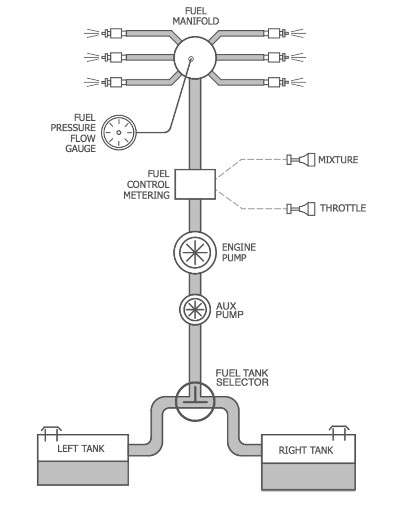
Example: Low-Wing, Pressure-Feed Single
This section discusses general topics related to X-Plane's fuel management model and the information here is relevant to all aircraft categories. Note that fuel consumption is not discussed in this section. See the Modeling Powerplants section of this manual for information on SFC.
In order to better understand the paragraphs below, we first discuss fuel management from a higher-level, schematic point of view. All aircraft have one thing in common with regards to their fuel systems design, and that is to make sure than any working engine can access all available fuel, which we will call the Primary Goal. This primary goal is accomplished using three basic control elements: Fuel Tanks, Flow Motivation (pumps / air pressure / gravity), and flow controls (valves). X-Plane uses these three component concepts in its fuel management model and you will see dataref and command names that reflect these element types.
In real aircraft, the logic behind how these components are arranged and operated vary widely and depend on all sorts of factors we do not go into here; however, a common theme throughout is that the primary goal be achieved with as little workload to the pilot as possible. For simple aircraft, fuel management is manually controlled, whereas in more complex aircraft, the fuel management is automatic with manual backups. X-Plane's model is flexible enough to accomodate most all fuel management configurations to ensure the Primary Goal is met, but does not model the minutia of the inidividual designs like check valves, vent/drain lines, refueling plumbing, strainers, solenoids, flow-rates, etc. X-Plane's fuel management model provides Tanks, Flow Motivation and basic valves such as fuel selectors and shut-off valves. Each is discussed below and practical applications for Single and Multi-Engine are given further below.
Aircraft Sideness
To X-Plane, the side of an aircraft that an engine or fuel tank is on is dependent upon the lateral location of the engine/tank set in PlaneMaker. If the lateral dimension is a negative value, X-Plane assumes the component is on the left side. If the lateral dimension is positive, then it is on the right side and if zero, then X-Plane assumes the engine/tank is on the centerline. In these docs, when discussing multi-engine configurations, we will occasionally use the term, on-side, which means the "same side as". For example, a left-side engine draws fuel from its on-side tanks, i.e. the fuel tanks on the left side of the aircraft.
Fuel Tanks
Fuel tanks, in general, are simple concepts and the most basic fuel management systems for small GA aircraft are quite easy to model; however, as you start adding more fuel tanks to an aircraft, then the model gets a bit more complex and we need to introduce some additional fuel tank modeling concepts. With multiple fuel tanks per side, tanks are not just tanks, but rather Feeder, Auxiliary, or Trim tanks, with each role serving differing purposes. The paragraphs below discuss X-Plane's tank types and also illustrate the PlaneMaker interface for configuring fuel tanks for X-Plane. You can hover over the PlaneMaker UI image below for additional pop-up tooltips on each widget. These pop-up tooltips are also on the UI reference page for Fuel tanks at Standard > Weight & Balance > Weight/Bal Tab
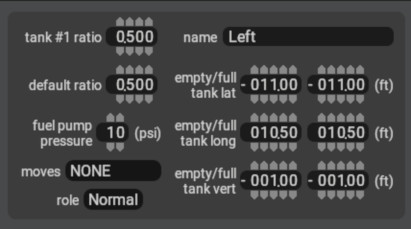
The amount of fuel in any given tank, regardless of X-Plane type, in Kgs, is available via the writable datarefs below (except where noted otherwise). For the array type dataref, the index value corresponds to the tank # shown in PlaneMaker. The example image below shows Tank #1 (index[0]). The first tank (upper left) in PlaneMaker is index[0] and the bottom right is index[8], increasing left to right and top to bottom, just like reading this text. Common practice is to create your fuel tanks in PlaneMaker from left to right, where index [0] is the leftmost tank; however, this is not required.
--ARRAY TYPE
sim/flightmodel/weight/m_fuel[n]            //  weight of fuel, in kg, for any tank [n], where n = (0-8)

--  NON-ARRAY TYPE "Convenience" datarefs, for first 3 tanks only.
sim/flightmodel/weight/m_fuel1              //  weight of fuel, in kg, in fuel tank #1 (index [0])
sim/flightmodel/weight/m_fuel2              //  weight of fuel, in kg, in fuel tank #2 (index [1])
sim/flightmodel/weight/m_fuel3              //  weight of fuel, in kg, in fuel tank #3 (index [2])

sim/flightmodel/weight/m_fuel_total         //  total weight, in kg, of all fuel tanks combined (read only)
Normal Tank
A Normal Tank is an X-Plane tank type and is a Legacy tank model, but still relevant. You can specify a tank's role to be a Normal Tank via pull-down option. This type of tank is perfectly adequate when you have no fancy fuel transfer control logic and no more than one fuel tank per side, along with a simple fuel selector. Note that these tank types do respect the Tank Pump Pressure setting in PlaneMaker, which is discussed further below.
Feeder Tank
A Feeder Tank is an X-Plane tank type that Feeds the engines and is commonly found in turbine aircraft. To call a tank a Feeder Tank implies that other fuel tanks are present to provide fuel TO the Feeder Tank, in order to keep it full at all times. (see Auxiliary Tank next). You can specify a fuel tank in PlaneMaker to be a feeder tank via pull-down option, which is the tank the engine will draw from. These tanks may be called differing names on schematic diagrams. For example, in a King-Air these would be the two, on-side Nacelle Tanks. In the Mitsubishi MU-2 high-wing, the Main Center tank etc. In multi-engine installations, feeder tanks will feed their on-side engines (unless crossfed, more below). If a feeder tank is located on the centerline (lateral = 0), then the feeder will feed both engines.
Auxiliary Tank
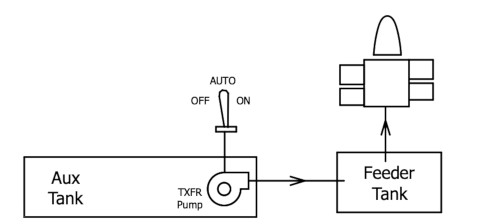
An auxiliary tank in X-Plane, is a fuel tank that does not feed the engines directly, but as described above, transfers fuel to a feeder tank via a Transfer Pump. Be aware that aircraft reference texts may use the term AUX Tank differently. For X-Plane purposes, an AUX Tank implies "a Feeder tank also". You can specify a tank in PlaneMaker to be an auxiliary (AUX) tank via pull-down option. In reality, auxiliary tanks can contain a physical displacement pump inside the tank or be pressurized with engine bleed air (a 'virtual' pump). The illustration at right shows X-Plane's relationship between an Aux tank and a Feeder Tank.
When multiple auxiliary tanks are specified on the same side in X-Plane, then the order in which they provide fuel to their feeder tank(s) is established by the Tank Pump Pressure value set in PlaneMaker. All AUX tanks on a side route fuel through only one Transfer Pump, X-Plane does not simulate per Aux tank transfer pumps. Control of the Transfer Pumps between the AUX and FEEDER tanks is via Transfer Pump Datarefs/Commands discussed further below.
Trim Tank
A Trim Tank is a fuel tank used to store fuel for the purpose of changing the CG in order to trim the aircraft in pitch and is located Aft (of empty CG) in the aircraft. Note that just because a fuel tank is located AFT in an aircraft does not automatically mean it is a Trim Tank. Trim tanks, by definition, are designed with "aircraft balancing" in mind. You can specify a fuel tank in PlaneMaker to be a Trim Tank via pull-down option. Fuel can be moved to/from a Trim (Aft) Tank in X-Plane ONLY by manual means using the fuel transfer datarefs below and setting one of them to 5, and the other one to where you want the fuel to come from (or go) from the trim tank. If multiple tanks are on a side (left/right), then the fuel will be distributed/taken evenly to all tanks on that side. If center or none is selected for one dataref while the other dataref is set to 5 then the fuel will be distributed/taken from ALL fuel tanks.
--  DATAREFS
sim/cockpit2/fuel/fuel_tank_transfer_from       //  0=none,1=left,2=center,3=right,5=aft
sim/cockpit2/fuel/fuel_tank_transfer_to         //  0=none,1=left,2=center,3=right,5=aft
Drop Tanks
In X-Plane, Drop Tanks are part of X-Plane's Weapons model, and configured through PlaneMaker's Build Weapons Window. See Manual section on Building Weapons
Tank CGs
Some fuel tanks have odd shapes, particularly in swept wings, such that as the fuel drains out of them, the Center of Gravity (Cg) of the fuel tank changes with the fuel level in the tank. In PlaneMaker, you can configure the Cg location of the tank for the full and empty states, and X-Plane will interpolate the Cg as fuel is drained from the tank.
PlaneMaker Fuel Tank Settings
The following image shows a single tank configuration panel from PlaneMaker. You can hover over the widgets to see pop-up tooltips describing each. These tooltips are also repeated on the Tanks UI reference page.
Motive Flow
Motive Flow is just a fancy way of saying "something that moves fuel around". The most basic motive flow is gravity. If your fuel tanks are higher than your engine, then fuel is available to your engine. After gravity, its usually fuel-pumps or a pressurized fuel tank that moves fuel around. Regarding fuel pumps, they may be referred to in reference texts by their pumping mechanism, "vane", "variable volume", their power source, "engine driven", "electric", or by the role they perform, "scavenge", "boost", transfer, "backup" etc. Below we discuss some common terms you may see in reference material to help clarify further discussion and how these terms may be related to X-Plane's pump components.
Boost Pump
A boost pump is used to boost the pressure of the fuel, which already makes this term a bit ambiguous as these pumps can be anywhere in a fuel system where you need to increase the fuel pressure, either for motive flow (moving fuel around) or atomization within fuel injectors. X-Plane does NOT use the term "boost" in any of its dataref names for fuel systems, but rather uses more descriptive terms. If you see the term boost pump in your reference material, then make sure you understand the context of its use so you can correlate it with the appropriate X-Plane pump model.
Fuel Pump
The term Fuel Pump in reference text generally refers to a Primary/Main Fuel Pump, which is typically a mechanical pump driven by the engine. Primary pumps can serve two purposes. For low-wing tank configurations, it moves/sucks fuel UP to the engine and for fuel-injected/turbine engines, provides the high pressure required for the fuel controller/injectors. For a low-wing, fuel-injected application, a single Primary fuel pump usually performs both tasks; however, some fuel-injection designs may have their own dedicated pump just for atomization. X-Plane does NOT model a Primary Mechanical Fuel Pump explicitly. Because these pumps are typically required to be engine driven, X-Plane simply assumes a Primary Pump exists with the engine and is ON and working if the engine is running. As such, no dataref names containing "fuel_pump" refer to the Primary Pump, but rather refer to an Auxiliary Electric backup pump described below. X-Plane does; however, allow you to fail the mechanical Primary Pump through its failure datarefs, sim/operation/failures/rel_fuepmp0 (0 thru 7).
Engine Driven Fuel Pump
The Engine Driven Fuel Pump (EDFP) is generally the Primary Fuel Pump, and typically required to be mechanically driven by the engine. As mentioned above, X-Plane assumes this pump is ON when the engine is running, though you can fail it through datarefs. Note that in very light, or alternative engine designs such as ultralights or automative engines, there is no mechanical engine driven pump, and an Electric pump may serve as the Primary fuel pump. To simulate this configuration, you can set the relevant mechanical fuel pump failure dataref(s) to 6 (failed), and cause X-Plane to look to the electric fuel pump (described next) for fuel delivery. X-Plane does not provide a model for an electric Primary fuel Pump with an electric backup.
Auxiliary Electric Fuel Pump
This pump may be referred to as auxiliary or electric and implies a backup to the Primary Mechanical Pump. Its job is to provide fuel pressure if the Primary Fuel pump fails, as well as provide fuel pressure prior/during engine starts on recips when the Primary Pump is not yet operating with engine RPM. Its also used sometimes when switching fuel tanks to ensure positive fuel flow during the tank swap. Because this pump is electrically controlled, it may be actuated manually or automatically. Be cautious in reading reference materials as many use the term "Fuel Pump" generically without specifying the Primary or Backup role. With one being mechanical and the other electrical, the difference matters to X-Plane. When X-Plane datarefs contain the text fuel_pump, then it refers to this electric fuel pump. The amount of power the Electric Fuel Pump consumes when on may be specified on Standard > Systems > Bus Loads (2nd tab). The following datarefs relate to X-Plane's Auxiliary Electric fuel pump:
sim/cockpit2/engine/actuators/fuel_pump_on[n]       //  cockpit switch for elec fuel pump:  0=off, 1=on (high), 2=auto (pressure-triggered)
sim/flightmodel2/engines/fuel_pump_spinning[n]      //  running state:  1 = yes, 0 = no. (for driving FMOD sounds)
sim/operation/failures/rel_ele_fuepmp0              //  failure enum for electric fuel pumps  (0-7 avail)
Sump - Scavenge Pump
The terms, "scavenge/sump" describe these pump's role and these terms are NOT used in X-Plane, but you may encounter mention of them in your reference material. These pumps are used inside fuel tanks and are designed/shaped to get the last bit of fuel out of the tank, i.e they "scavenge" the last bit of fuel. Sump refers to the lowest part of a fluid tank/circuit where the fluid collects due to gravity and generally the point where you want to suck fuel from. Depending on the shape of the tank/sump, these pumps still may not be able to scavenge all the fuel in the tank, which is why there is a difference between total fuel and usable fuel in some designs. Total fuel is important for weight considerations and usable fuel is important for range considerations. The unusable fuel is the fuel in the tank the scavenge pumps cannot reach. For X-Plane, scavenge pumps are essentially Tank Pumps, and is described next.
Tank Pump
Tank Pumps generically refers to pumps located inside the fuel tanks themselves. These are frequently called boost pumps in reference literature and are commonly found in more complex turbine/jet aircraft to provide Motive Flow Pressure to move fuel around automatically. Each fuel tank in X-Plane may be assigned a Fuel Pump Pressure PSI value. We refer to these pumps as Tank Pumps.
X-Plane's Tank pressure model pre-dates the newer Role-Based fuel tank model now in X-Plane, but complements it further. For multiple fuel tanks set to the same role and both feeding the same downstream component (engine or feeder tank), then the tank PSI value will control which tank drains first. A practical example is an MU-2 which have 1 Center Feeder Tank and 2 Aux tanks per side (5 tanks total). By setting the outboard Aux tanks (wingtip tanks) to a higher PSI value than the inboard Aux tank, these tip-tanks will drain into the center Feeder tank first, per the real system behavior. Tank PSI values are writable by dataref and are a flexible mechanism for creating more customized fuel management logic via plugin or script.
sim/cockpit2/fuel/fuel_tank_pump_on[n]          //  0-8 indicies avail
sim/cockpit2/fuel/tank_pump_pressure_psi[n]     //  0-8 indicies avail
Transfer Fuel Pumps
Transfer Fuel Pumps are an X-Plane type, and refer to pumps that specifically transfer fuel from X-Plane's AUX type tanks, to X-Plane's FEEDER type tanks. This is shown in the illustration up above. These pumps have manual and automatic operational modes. In the auto mode, they transfer fuel from AUX > FEEDER based on how full the feeder tank is. As fuel is consumed from the feeder, then the Transfer pumps will cut on at some point and fill the Feeder tank back up. When the Feeder gets "full", the Transfer Pump is cut off. The fuel levels of the Feeder Tank, at which point the Transfer Pumps cut ON and OFF can be specified via dataref. Note that the rate of fuel transfer is not configurable, if you need to control the rate of fuel transfer, you will need to forego the default transfer pumps and instead code your own via plugin/script, ultimately writing to the per-tank fuel mass datarefs per your own logic. The following datarefs relate to the operation of X-Plane's default Fuel Transfer Pumps.
sim/cockpit2/fuel/transfer_pump_activation          //  for AUTO mode. Kg from "full", when the txfr pump automatically cuts ON
sim/cockpit2/fuel/transfer_pump_deactivation        //  for AUTO mode. Kg from "full", when the txfr pump automatically cuts OFF
sim/cockpit2/fuel/transfer_pump_left                //  0: Off, 1: Auto, 2: On/Override
sim/cockpit2/fuel/transfer_pump_right               //  0: Off, 1: Auto, 2: On/Override
sim/cockpit2/fuel/transfer_test
Fuel Transfer / Valves
WARNING
When assessing your fuel transfer behaviors in X-Plane, and monitoring fuel tank quantity datarefs for feedback, Be Aware that X-Plane's update frequency with regards to fuel quanity, consumption and transfer assessment is not every flight loop. Expect to observe fuel tank quanitites on the order of 1/2 minutes to evaluate fuel transfers and which tanks are being depleted.
When an engine is drawing fuel from multiple tanks, X-Plane may not draw fuel from all tanks at the exact same time, but rather alternate between tanks. So you may see only one tank being deleted at a time, rather than all. Again, expect to monitor fuel tank quantities on the order of 1/2 minutes to be sure of the behaviors.
X-Plane simulates three types of fuel control valves: 1) Fuel Selector, 2) Crossfeed and 3) Firewall Shutoff. Crossfeed is discussed separately in the section below. Valve positions are specified via the datarefs below. Fuel selectors determine which side (or both/center) fuel is drawn from; however, in multiple tank configurations per side then the tank role and/or Tank Pump Pressures discussed above will determine the exact tank fuel is drawn from on the selected side. To reiterate, when you see the terms left/right below, do not think of left/right TANK, but rather left/right SIDE, which may have one or more tanks.
--FIREWALL SHUTOFF DATAREFS
sim/cockpit2/fuel/firewall_closed_left              //  shuts off all fuel to left side engines
sim/cockpit2/fuel/firewall_closed_right             //  shuts off all fuel to right side engines

--FUEL SELECTORS
sim/cockpit/engine/fuel_tank_selector (legacy)      //  0=none,1=left,2=center,3=right,4=all,5=aft

sim/cockpit2/fuel/fuel_tank_selector                //  0=none,1=left,2=center,3=right,4=all,5=aft
sim/cockpit2/fuel/fuel_tank_selector_left           //  0=none,1=left,2=center,3=right,4=all,5=aft   (for multi-engine)
sim/cockpit2/fuel/fuel_tank_selector_right          //  0=none,1=left,2=center,3=right,4=all,5=aft   (For multi-engine)
Crossfeed
Crossfeed means an engine on one side of a multi-engine aircraft is drawing fuel from the opposite side fuel tanks (usually in the wings) and is usually only present on installations with fuel pumps. Crossfeed implementations are generally allowed to only draw from one tank/side at a time. If a crossfeed system were plumbed to draw fuel from tanks on both sides of an aircraft and one side went empty, then the fuel pump would suck in air from the empty tank rather than from the tank with fuel. X-Plane have the following datarefs for implementing crossfeed:
--TANK CROSSFEED DATAREFS  (typical for recips)
sim/cockpit2/annunciators/crossfeed_on              //  Crossfeed Annunciator
sim/cockpit2/fuel/fuel_crossfeed_selector           //  0=none,1=from left tank,3=from right tank.  (not true crossfeed, for simple singles)
sim/cockpit2/fuel/fuel_gravity_crossflow            //  0=closed, 1=open.   Fuel "balances" between left/right tanks when open

--ENGINE CROSSFEED DATAREF (typical large turbines/jets)
sim/cockpit2/fuel/auto_crossfeed                    //  0=Off 1=Auto 2=On
Single Engine
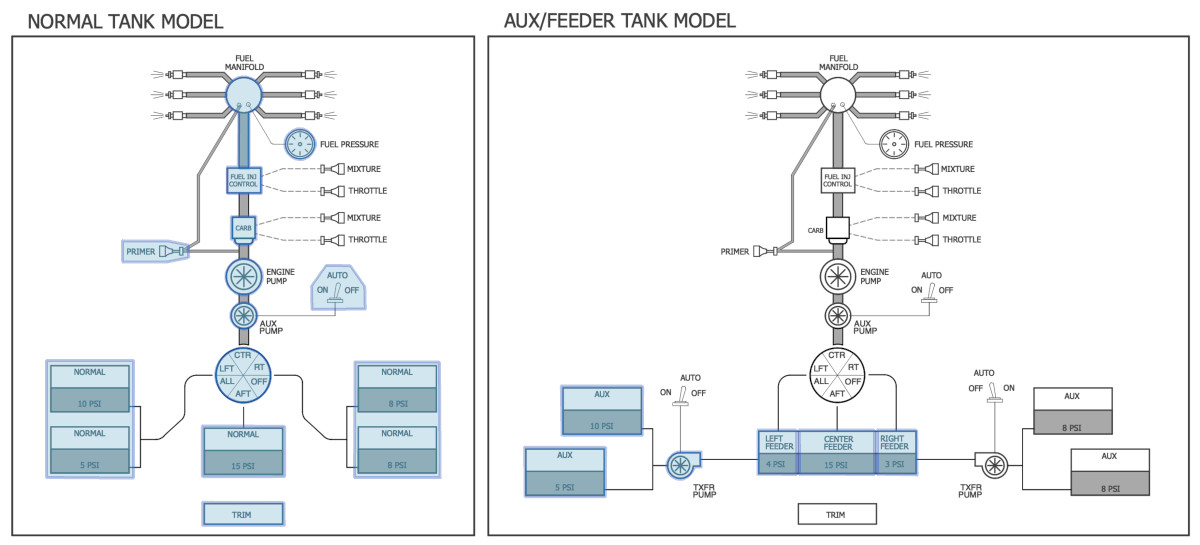
Here we present two examples for a single-engine application using the NORMAL tank and FEEDER-AUX tank components. Though the NORMAL type tanks may be used with the FEEDER/AUX tank types, they were not intended to be used together. The defining characteristic of the single engine configuration is a single fuel selector, through which all fuel must flow to the engine. Fuel can flow through this selector from the left side, right side, center, depending on the location of the fuel tanks set in PlaneMaker, as well as the fuel selector options specified.
The diagram below shows all of X-Plane's possible fuel management components typical for single engine configurations. Typical applications will only use a subset of these components relevant to their design. Everything downstream of the selector, including the selector itself is implemented via dataref, whereas the tanks are configured in PlaneMaker. If your aircraft uses a carbureted engine with gravity feed for example, then simply ignore and do not use any datarefs relating to the fuel control/pressure/pumps, etc.
Multi Engine
Fuel Datarefs
sim/cockpit2/fuel/firewall_closed_left              //  shuts off fuel to left side engine
sim/cockpit2/fuel/firewall_closed_right             //  shuts off fuel to right side engine
sim/cockpit2/fuel/fuel_crossfeed_selector           //  no clue what this is for
sim/cockpit2/fuel/fuel_gravity_crossflow            //  Simple open/closed valve to connect tanks on either side
sim/cockpit2/fuel/fuel_level_indicated_left         //  total fuel in all tanks, left side
sim/cockpit2/fuel/fuel_level_indicated_right        //  total fuel in all tanks, right side
sim/cockpit2/fuel/fuel_quantity[n]                  //  total fuel in all tanks, entire aircraft
sim/cockpit2/fuel/fuel_tank_pump_on[n]              //  Elec/Aux backup fuel pump run state
sim/cockpit2/fuel/fuel_tank_selector                //  Source Side. 0/1/2/3/4/5,  None/Left/Center/Right/All/Aft
sim/cockpit2/fuel/fuel_tank_selector_left           //  Source Side, left engine.  0/1/2/3/4/5, same as above.  Typ light twins.
sim/cockpit2/fuel/fuel_tank_selector_right          //  Source Side, right engine.  0/1/2/3/4/5, same as above. Typ light twins.
sim/cockpit2/fuel/fuel_tank_source_for_engine[n]    //  The tank excess fuel returns TO (excess out of pump)
sim/cockpit2/fuel/fuel_tank_transfer_from           //  Tank that fuel comes from for transfer
sim/cockpit2/fuel/fuel_tank_transfer_to             //  Tank that fuel goes to for tranfer
sim/cockpit2/fuel/fuel_temp_at_fuel_tank[n]         //  Fuel temp.  XP models cold-soaking at altitude
sim/cockpit2/fuel/fuel_temp_at_oil_cooler[n]        //  Fuel temp after passing through heat exchanger.
sim/cockpit2/fuel/fuel_totalizer_init_kg            //  Totalizer's initial value of all fuel on board
sim/cockpit2/fuel/fuel_totalizer_sum_engine_kg[n]   //  Total fuel consumed by engine #[n] since totalizer init
sim/cockpit2/fuel/fuel_totalizer_sum_kg             //  Total fuel consumed by all engines since totalizer init
sim/cockpit2/fuel/no_transfer_left                  //  Annunciator when left Aux tank(s) feeding "feeder" runs dry
sim/cockpit2/fuel/no_transfer_right                 //  Annunciator when right Aux tank(s) feeding "feeder" runs dry
sim/cockpit2/fuel/showing_aux                       //  0/1 boolean.  1 if user is holding down aux Tank button
sim/cockpit2/fuel/tank_pump_pressure_psi[n]         //  Current pressure of Tank #[n]
sim/cockpit2/fuel/transfer_pump_activation          //  The fuel level transfer pump is activated when in auto mode
sim/cockpit2/fuel/transfer_pump_deactivation        //  the fuel level transfer pump is deactivated when in auto mode
sim/cockpit2/fuel/transfer_pump_left                //  The run state of the left transfer pump.  0/1/2,  Off/On/Auto
sim/cockpit2/fuel/transfer_pump_right               //  The run state of the right transfer pump.  0/2/2,  Off/On/Auto
sim/cockpit2/fuel/transfer_test                     //   Test switch,  -1/0/1,  test left/normal/test right
sim/cockpit2/fuel/fuel_tank_pump_on[1]              //  Fuel Pump actuator.  0/1,  OFF/ON.
Fuel Commands
----FUEL RELATED COMMANDS

sim/fuel/fuel_tank_selector_lft_one              // Select fuel tank left one.
sim/fuel/fuel_tank_selector_rgt_one              // Select fuel tank right one.
sim/fuel/fuel_tank_pump_1_on                     // Fuel pump for tank #1 on.
sim/fuel/fuel_tank_pump_2_on                     // Fuel pump for tank #2 on.
sim/fuel/fuel_tank_pump_3_on                     // Fuel pump for tank #3 on.
sim/fuel/fuel_tank_pump_4_on                     // Fuel pump for tank #4 on.
sim/fuel/fuel_tank_pump_5_on                     // Fuel pump for tank #5 on.
sim/fuel/fuel_tank_pump_6_on                     // Fuel pump for tank #6 on.
sim/fuel/fuel_tank_pump_7_on                     // Fuel pump for tank #7 on.
sim/fuel/fuel_tank_pump_8_on                     // Fuel pump for tank #8 on.
sim/fuel/fuel_tank_pump_9_on                     // Fuel pump for tank #9 on.
sim/fuel/fuel_tank_pump_1_off                    // Fuel pump for tank #1 off.
sim/fuel/fuel_tank_pump_2_off                    // Fuel pump for tank #2 off.
sim/fuel/fuel_tank_pump_3_off                    // Fuel pump for tank #3 off.
sim/fuel/fuel_tank_pump_4_off                    // Fuel pump for tank #4 off.
sim/fuel/fuel_tank_pump_5_off                    // Fuel pump for tank #5 off.
sim/fuel/fuel_tank_pump_6_off                    // Fuel pump for tank #6 off.
sim/fuel/fuel_tank_pump_7_off                    // Fuel pump for tank #7 off.
sim/fuel/fuel_tank_pump_8_off                    // Fuel pump for tank #8 off.
sim/fuel/fuel_tank_pump_9_off                    // Fuel pump for tank #9 off.
sim/fuel/fuel_selector_none                      // Set fuel selector to none (shut off).
sim/fuel/fuel_selector_lft                       // Set fuel selector to left tanks.
sim/fuel/fuel_selector_ctr                       // Set fuel selector to center tanks.
sim/fuel/fuel_selector_rgt                       // Set fuel selector to right tanks.
sim/fuel/fuel_selector_aft                       // Set fuel selector to aft (trim) tanks.
sim/fuel/fuel_selector_all                       // Set fuel selector to all tanks.
sim/fuel/fuel_selector_none2                     // Set fuel selector to none (shut off), alternate position.
sim/fuel/left_fuel_selector_none                 // Set fuel selector for left engine to none (shut off).
sim/fuel/left_fuel_selector_lft                  // Set fuel selector for left engine to left tanks.
sim/fuel/left_fuel_selector_ctr                  // Set fuel selector for left engine to center tanks.
sim/fuel/left_fuel_selector_rgt                  // Set fuel selector for left engine to right tanks.
sim/fuel/left_fuel_selector_aft                  // Set fuel selector for left engine to aft (trim) tanks.
sim/fuel/left_fuel_selector_all                  // Set fuel selector for left engine to all tanks.
sim/fuel/left_fuel_selector_down                 // Fuel selector for left engine down one position.
sim/fuel/left_fuel_selector_up                   // Fuel selector for left engine up one position.
sim/fuel/right_fuel_selector_none                // Set fuel selector for right engine to none (shut off).
sim/fuel/right_fuel_selector_lft                 // Set fuel selector for right engine to left tanks.
sim/fuel/right_fuel_selector_ctr                 // Set fuel selector for right engine to center tanks.
sim/fuel/right_fuel_selector_rgt                 // Set fuel selector for right engine to right tanks.
sim/fuel/right_fuel_selector_aft                 // Set fuel selector for right engine to aft (trim) tanks.
sim/fuel/right_fuel_selector_all                 // Set fuel selector for right engine to all tanks.
sim/fuel/right_fuel_selector_down                // Fuel selector for right engine down one position.
sim/fuel/right_fuel_selector_up                  // Fuel selector for right engine up one position.
sim/fuel/fuel_transfer_to_lft                    // Transfer fuel to left.
sim/fuel/fuel_transfer_to_ctr                    // Transfer fuel to center.
sim/fuel/fuel_transfer_to_rgt                    // Transfer fuel to right.
sim/fuel/fuel_transfer_to_aft                    // Transfer fuel to aft.
sim/fuel/fuel_transfer_to_off                    // Transfer fuel to none.
sim/fuel/fuel_transfer_from_lft                  // Transfer fuel from left.
sim/fuel/fuel_transfer_from_ctr                  // Transfer fuel from center.
sim/fuel/fuel_transfer_from_rgt                  // Transfer fuel from right.
sim/fuel/fuel_transfer_from_aft                  // Transfer fuel from aft.
sim/fuel/fuel_transfer_from_off                  // Transfer fuel from none.
sim/fuel/fuel_crossfeed_from_lft_tank            // Cross-feed fuel from left tank.
sim/fuel/fuel_crossfeed_off                      // Cross-feed fuel off.
sim/fuel/fuel_crossfeed_from_rgt_tank            // Cross-feed fuel from right tank.
sim/fuel/fuel_firewall_valve_lft_open            // Firewall fuel valve left open.
sim/fuel/fuel_firewall_valve_lft_closed          // Firewall fuel valve left closed.
sim/fuel/fuel_firewall_valve_rgt_open            // Firewall fuel valve right open.
sim/fuel/fuel_firewall_valve_rgt_closed          // Firewall fuel valve right closed.
sim/fuel/left_xfer_override                      // Aux to feeder transfer left override.
sim/fuel/left_xfer_on                            // Aux to feeder transfer left on.
sim/fuel/left_xfer_off                           // Aux to feeder transfer left off.
sim/fuel/left_xfer_up                            // Aux to feeder transfer left off->on->overide.
sim/fuel/left_xfer_dn                            // Aux to feeder transfer left override->on->off.
sim/fuel/right_xfer_override                     // Aux to feeder transfer right override.
sim/fuel/right_xfer_on                           // Aux to feeder transfer right on.
sim/fuel/right_xfer_off                          // Aux to feeder transfer right off.
sim/fuel/right_xfer_up                           // Aux to feeder transfer right off->on->overide.
sim/fuel/right_xfer_dn                           // Aux to feeder transfer right override->on->off.
sim/fuel/left_xfer_test                          // Aux to feeder transfer test left.
sim/fuel/right_xfer_test                         // Aux to feeder transfer test right.
sim/fuel/totalizer_init                          // Initialize fuel totalizer to actual fuel.
sim/fuel/auto_crossfeed_on_open                  // Crossfeed valve open.
sim/fuel/auto_crossfeed_auto                     // Open crossfeed valve when pressure difference detected.
sim/fuel/auto_crossfeed_off                      // Close crossfeed valve and turn off auto-crossfeed.
sim/fuel/auto_crossfeed_up                       // Auto-crossfeed off->auto->on.
sim/fuel/auto_crossfeed_down                     // Auto-crossfeed on->auto->off.
sim/fuel/fuel_pumps_on                           // Fuel pumps on.
sim/fuel/fuel_pumps_off                          // Fuel pumps off.
sim/fuel/fuel_pumps_tog                          // Fuel pumps toggle.
sim/fuel/fuel_pump_1_on                          // Fuel pump for engine #1 on.
sim/fuel/fuel_pump_2_on                          // Fuel pump for engine #2 on.
sim/fuel/fuel_pump_3_on                          // Fuel pump for engine #3 on.
sim/fuel/fuel_pump_4_on                          // Fuel pump for engine #4 on.
sim/fuel/fuel_pump_5_on                          // Fuel pump for engine #5 on.
sim/fuel/fuel_pump_6_on                          // Fuel pump for engine #6 on.
sim/fuel/fuel_pump_7_on                          // Fuel pump for engine #7 on.
sim/fuel/fuel_pump_8_on                          // Fuel pump for engine #8 on.
sim/fuel/fuel_pump_1_off                         // Fuel pump for engine #1 off.
sim/fuel/fuel_pump_2_off                         // Fuel pump for engine #2 off.
sim/fuel/fuel_pump_3_off                         // Fuel pump for engine #3 off.
sim/fuel/fuel_pump_4_off                         // Fuel pump for engine #4 off.
sim/fuel/fuel_pump_5_off                         // Fuel pump for engine #5 off.
sim/fuel/fuel_pump_6_off                         // Fuel pump for engine #6 off.
sim/fuel/fuel_pump_7_off                         // Fuel pump for engine #7 off.
sim/fuel/fuel_pump_8_off                         // Fuel pump for engine #8 off.
sim/fuel/fuel_pump_1_tog                         // Fuel pump for engine #1 toggle.
sim/fuel/fuel_pump_2_tog                         // Fuel pump for engine #2 toggle.
sim/fuel/fuel_pump_3_tog                         // Fuel pump for engine #3 toggle.
sim/fuel/fuel_pump_4_tog                         // Fuel pump for engine #4 toggle.
sim/fuel/fuel_pump_5_tog                         // Fuel pump for engine #5 toggle.
sim/fuel/fuel_pump_6_tog                         // Fuel pump for engine #6 toggle.
sim/fuel/fuel_pump_7_tog                         // Fuel pump for engine #7 toggle.
sim/fuel/fuel_pump_8_tog                         // Fuel pump for engine #8 toggle.
sim/fuel/fuel_pump_1_prime                       // Fuel pump prime for engine #1 on.
sim/fuel/fuel_pump_2_prime                       // Fuel pump prime for engine #2 on.
sim/fuel/fuel_pump_3_prime                       // Fuel pump prime for engine #3 on.
sim/fuel/fuel_pump_4_prime                       // Fuel pump prime for engine #4 on.
sim/fuel/fuel_pump_5_prime                       // Fuel pump prime for engine #5 on.
sim/fuel/fuel_pump_6_prime                       // Fuel pump prime for engine #6 on.
sim/fuel/fuel_pump_7_prime                       // Fuel pump prime for engine #7 on.
sim/fuel/fuel_pump_8_prime                       // Fuel pump prime for engine #8 on.
sim/fuel/engine_1_primer                         // Actuate the primer plugin on engine #1.
sim/fuel/engine_2_primer                         // Actuate the primer plugin on engine #2.
sim/fuel/engine_3_primer                         // Actuate the primer plugin on engine #3.
sim/fuel/engine_4_primer                         // Actuate the primer plugin on engine #4.
sim/fuel/engine_5_primer                         // Actuate the primer plugin on engine #5.
sim/fuel/engine_6_primer                         // Actuate the primer plugin on engine #6.
sim/fuel/engine_7_primer                         // Actuate the primer plugin on engine #7.
sim/fuel/engine_8_primer                         // Actuate the primer plugin on engine #8.
sim/fuel/re-fuel_half                            // Re-fuel the plane to half tanks!
sim/fuel/re-fuel_full                            // Re-fuel the plane to full tanks!
sim/fuel/indicate_aux                            // Fuel tanks show auxiliary tanks.
sim/fuel/indicate_all                            // Fuel tanks show all tanks.
sim/fuel/indicate_nacelle                        // Fuel tanks show nacelle tanks.
Hallo Jan,
X-Plane already does pretty much exactly what you want, the fuel pump switches in the 737 3d cockpit are arguably just hooked to the wrong datarefs.
To see what I mean, check the King Air.
On the left side panel you see it has fuel boost pumps. Turn off automatic cross feeding, then turn off a boost pump.
As you can see, you'll get a low fuel pressure warning, BUT the engine continues to run.
This is exactly the behavior you are describing: the electric fuel boost pump no longer pushes the pressure as high as we like, but the engine-driven fuel pump can totally suck enough fuel into the engine to keep the fire lit.
The reason this works is that the switches in the King Air use the datarefs for the engine fuel boost pumps: sim/cockpit/engine/fuel_pump_on[N] where N is the engine.
The 737 cockpit looks like it is using sim/cockpit2/fuel/fuel_tank_pump_on[N] where [N] is the tank number, not the engine number.
This does something different: This assumes the tank cannot feed fuel to the fuel selector because of gravity. This is appropriate for a center wing box tank, which needs to pump fuel UP to get it to the engines, as opposed to the wing tanks from where fuel can gravity-feed into the engines below.
Turning fuel_tank_pump_on to off for a tank basically tells X-Plane to not use the tank, hence why you get a flameout if this is the tank that is feeding the engine.
My suggestion is therefore to use the engine pump, not tank pump datarefs since they match the expected behavior of boost pumps. Since the 737 fuel system is different from the King Air in that the pump is located at the tank, before the cross feed valve (and not at the engine behind the cross feed valve) you will need some lua-scripting to take the cross feed valve into account which engine pump can currently see which tank.
For the normal operation (crossfeed closed) the default behavior will already be correct.
I would do a simple script that does the following:
-The center fuel pump switches correspond to the tank pump of the center tank, since you simply won't get fuel out of the center if they are not running.
- if the cross-feed valve is closed, (tank-to-engine configuration) the left and right fuel pump switches simply correspond to the left and right electric boost pumps, and the pressure annunciators correspond to the fuel pressure at the engine. This will be high with the boost pump on, and low but still allowing fuel flow with the boost pump off (i.e. exactly like on the King Air).
- if the cross-feed valve is open, determine whether both sides have equal boosted pressure, either by all fuel pump switches on or all of them off. If not, determine which side has been (partially) turned off. Then turn off that side's tank pump, this won't cause a flameout since both engines will be fed from the remaining tank, which is exactly what you want when you are trying to fix an imbalance with cross-feeding.
This will allow the engines to run without extra boost, make it easy to get the annunciators right, and preserve correct cross-feeding behavior.
None of this will require any changes to the X-Plane fuel system.
Philipp