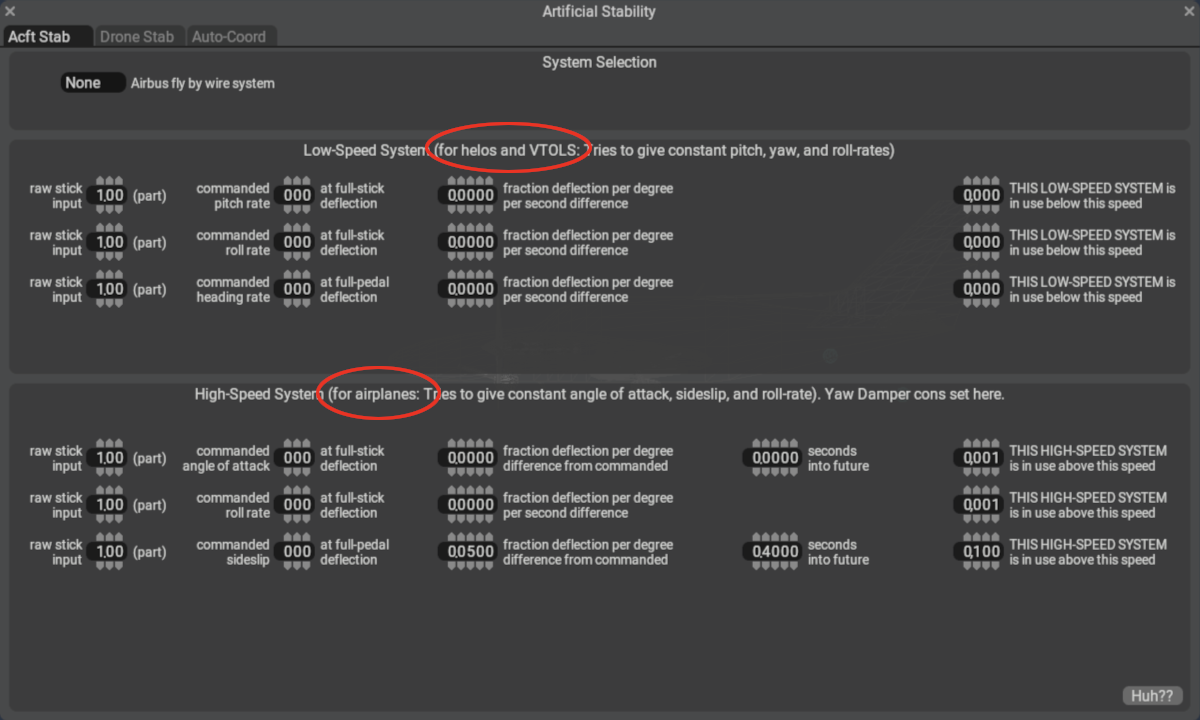
General
NOTE
We recommend you watch Austin's video below explaining the artificial stability settings on this page for more information and clarification of these settings.
The Aircraft Stability Window is suitable for configuring aircraft control response behaviors for the three primary scenarios listed below.
- VTOL control with little to no airpseed
- Airbus Aircraft with Control Laws
- Limit rotation rates (pitch, roll, yaw) to alter your perception of handling.
These types of controls are generally found on some VTOLS and fly-by-wire type aircraft that have CPUs and sophisticated control algorithms. For Airbus style control, there is a pulldown on the Acft Stab tab to specify the type of Airbus Control. There is a A320 option, and an A330 option with some additional settings. To configure your own custom parameters, utilize the NONE pulldown option, whose parameters are shown above.
These settings can optionally be utilized to compensate for unrealistic aircraft feel due to the lack of force-feedback in consumer flight sim hardware. For example, given an aircraft with no power-assisted controls and in a dive, the aerodynamic force would prevent you from being able to deflect the controls fully, your muscles simply would not be strong enough; however, in flight sims, there is no such resistance on the stick/yoke. This can lead to an unrealistic sense of aircraft handling when the stick/yoke is deflected near its limit of travel. By optionally limiting the rotation rates with these settings, you may achieve a more accurate perception of aircraft handling. This perception differs from individual to individual.
See individual tooltips for each widget for more information.