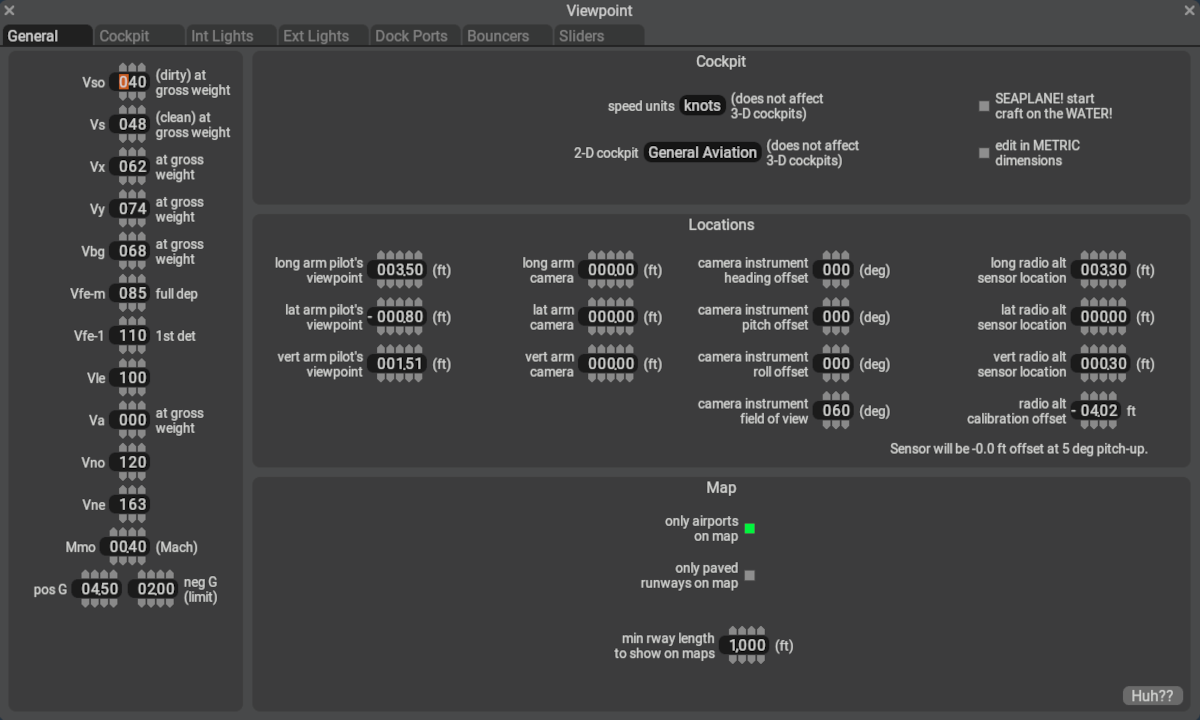
General
This General Tab of the Viewpoint Window is used to enter some generic, high-level meta data pertinent to the aircraft configuration. Several of these parameters are required to be entered before X-Plane will load your aircraft, so these should be filled out first whenever creating a new aircraft. Austin discusses this PlaneMaker page in the accompanying video below:
V-Speeds
V-Speeds are established by aircraft manufacturers through the flight testing of their aircraft. If you are modeling an established aircraft design, then the V-speed are usually found in the Flight Manual / Handbook of the aircraft. If you do not have a manual, or are designing a custom design, you will have to enter some representative values here. Several of these values are required for X-Plane to save your aircraft file. If you leave a few of these blank and try to save your aircraft, PlaneMaker will let you know it is not happy. If you want to learn more about V-speeds to help you understand these parameters, here are some links you can investigate, and in the table further below, descriptions of the V-Speeds that can be set in PlaneMaker
PlaneMaker V-Speeds
| Speed | Description |
|---|---|
| Vso | Stall speed in the landing configuration, flaps and gear down |
| Vs | Stalling speed in a clean configuration, flaps/gear up |
| Vmc | Minimum Controllable Airspeed (twins) |
| Vx | Speed for best angle of climb |
| Vy | Speed for best rate of climb |
| Vyse | Best rate of climb one engine (twins) |
| Vbg | Design speed for maximum gust intensity |
| Vfe-m | Maximum flap extended speed |
| Vfe-1 | Maximum flap extended speed |
| Vle | Maximum Gear extension Speed |
| Va | Design maneuvering speed |
| Vno | Maximum structural cruising speed |
| Vne | Never-exceed speed |
| Mmo | Maximum Operating Mach |
G-Limits
These values are the maximum G-forces the aircraft is ALLOWED to achieve in flight and is, in most cases, established by a governing authority like the FAA based on the category you are designing your aircraft for. When engineers design aircraft structures, they generally design the aircraft to handle 1.5x these G-factor loads at gross weight. That's a lot of stress! If you pull significantly more G-s than you set here, bad things may happen in X-Plane! Different governing aviation authorities may use differing terms and limits.
| FAA Category | Positive Gs | Negative Gs |
|---|---|---|
| Normal | 3.8 | -1.52 |
| Utility | 4.4 | -1.76 |
| Aerobatic | 6.0 | -3.0 |